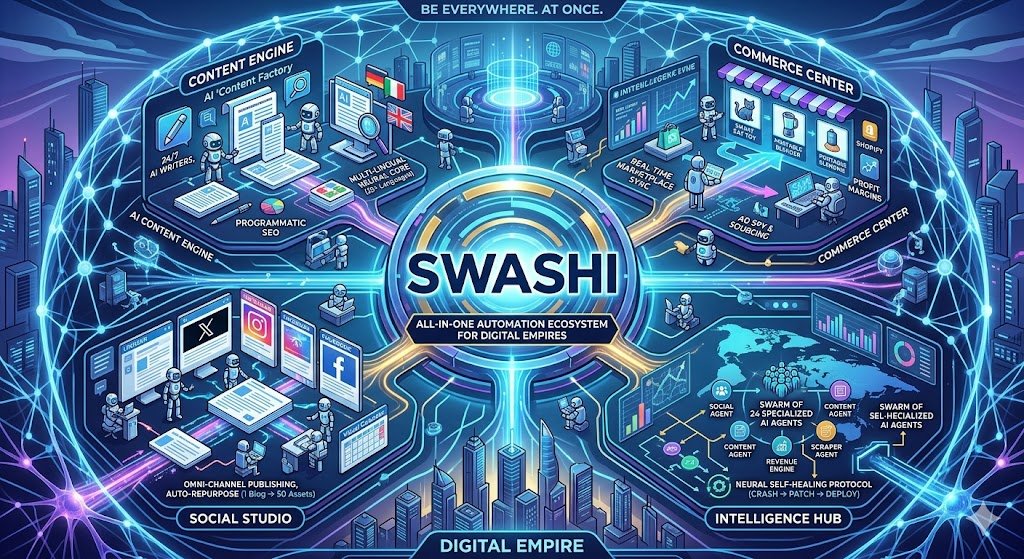
In the relentless race of the digital economy, time is the most valuable commodity. For dropshippers, agencies, and media houses, juggling multiple platforms, managing endless tasks, and staying ahead of trends can feel like an impossible feat. Swashi emerges as the antidote to this chaos, offering a revolutionary, all-in-one automation ecosystem designed to “Automate the Boring, Scale the Brilliant.” Launched to widespread acclaim in early 2025, Swashi has quickly become the go-to operating system for digital businesses seeking to amplify their reach, streamline their processes, and unlock unprecedented levels of efficiency. This deep dive explores every facet of Swashi, from its core engines to its pricing plans, chatbot functionalities, and future-ready integrations.
Key Takeaways
- Swashi is an all-in-one platform designed to automate content, ecommerce, and social media management.
- The platform features specialized engines for content generation, dropshipping intelligence, and social media management.
- Swashi leverages AI to create SEO-optimized articles, find winning products, and manage brand presence across multiple platforms.
- The platform offers various plans, including Free, Starter, Pro, and Agency, each with different features and limits.
- Swashi offers chatbot capabilities to fetch news, queue content, create articles, check account status, and provide help.
- Swashi integrates with popular CMS platforms like WordPress, Shopify, and Ghost, as well as social media platforms.
- The platform includes prompt personas that allow users to customize AI personalities for content generation.
The Power of Viral Intelligence and Advertising Automation
Swashi’s Research Scanner empowers users to dissect competitor websites and extract their content strategies. By simply entering a URL, users can uncover trending topics in their niche and gain AI-driven insights for creating winning content. This tool provides a strategic advantage by identifying viral themes and suggesting content opportunities, saving countless hours on manual research. It offers a competitive edge by unveiling the content strategies of successful competitors, allowing users to refine their approach and maximize impact, enabling a business to effectively understand the current market and respond.
The Advertising Engine automates the creation and syndication of ads across multiple platforms, including Google Ads, Facebook Ads, and TikTok Ads. With AI ad copy generation, users can craft compelling headlines and descriptions to attract their target audience. The engine also supports creative generation, automatically creating ad images to enhance visual appeal. By streamlining the ad creation process, Swashi empowers users to launch effective advertising campaigns with minimal effort, reducing time investment and maximizing reach, ensuring campaigns are created effectively and implemented across channels without significant manual work.
Prompt Personas offer a unique level of customization, allowing users to create custom AI personalities for content generation. Each plan includes a different number of personas, ranging from zero in the Free plan to 150 in the Agency plan. These personas can be tailored to mimic specific writing styles, tones, and expertise levels. This feature allows users to create highly targeted content that resonates with their audience, increasing engagement and conversions. By leveraging prompt personas, users can maintain a consistent brand voice across all their content, enhancing brand recognition and customer loyalty.
Swashi’s AI capabilities are significantly bolstered by the platform’s strategic use of multiple AI models. Beyond the base features, Swashi leverages advanced AI through Postiz integration to enhance social media engagement and scheduling. The Social Engine uses Postiz to analyze engagement data and schedule posts at times that maximize reach and audience interaction, allowing a much wider range of content output and ensuring high traffic is maintained for generated material.
Navigating Plan Limits and Pricing
Swashi offers a range of plans tailored to suit different business needs, from solopreneurs to large agencies. The Free plan provides a taste of Swashi’s capabilities, offering 2 auto-posts per month, 5 social posts per month, a trial viral research scan, and connection to one website. The Starter plan, priced at $29 per month, increases these limits to 10 auto-posts, 20 social posts, 5 viral research scans, 3 connected websites, and includes 5 prompt personas. This plan is ideal for businesses looking to expand their automation efforts and explore more features.
The Pro plan, at $49 per month, unlocks even more powerful features, including 30 auto-posts per month, 100 social posts per month, 50 viral research scans, and 10 connected websites. It also includes 30 prompt personas, Creative Director Mode, and HD DALL-E 3 image generation. This plan is designed for businesses that require more extensive automation and advanced AI capabilities. Creative Director Mode and high-definition image generation enable users to create high-quality content, while the increased limits support growing content and social media needs.
The Agency plan, priced at $199 per month, is designed for agencies and large media houses requiring the most comprehensive automation. It offers 150 auto-posts per month, 500 social posts per month, 200 viral research scans, and 25 connected websites. This plan includes 150 prompt personas, priority processing, unlimited keyword queues, and full API access. Priority processing ensures that tasks are completed quickly, while unlimited keyword queues allow for extensive content planning. Full API access enables advanced integrations and customization.
Each plan is designed to cater to different needs, offering the right balance of features and limits. Users can choose the plan that best aligns with their business goals, whether they are focused on content creation, ecommerce automation, or social media management. Swashi also is keen on allowing scaling of the chosen plan, ensuring the platform chosen is easily changeable should circumstances alter. Therefore, scalability of the platform ensures a high level of customer satisfaction.
The Swashi Operator: Your AI Interface
The Swashi Operator serves as the AI interface to this powerful automation ecosystem. Acting as a personal AI assistant, you can execute various actions to streamline your workflow. For example, the fetch_news command allows you to retrieve the latest news by category. The queue_content command adds items to your publishing queue, streamlining content creation. The create_article command queues an article on any topic, while the check_status command shows your credits, queue, and plan details. It is a comprehensive resource for content management.
The Swashi Operator offers several additional commands to enhance your productivity and workflow management. The show_menu command displays all available options, providing a quick reference to the bot’s capabilities. The show_help command explains how to use the bot’s various commands, offering guidance and support as needed. The reset_conversation command cancels the current flow, allowing you to start fresh with a new task or query. These features enable seamless interaction and task management within the Swashi platform, optimizing your content and operational strategy effectively and dynamically.
Security is a paramount concern within the Swashi ecosystem, and several rules are in place to protect user data and prevent unauthorized actions. DELETE actions require a 6-digit Support Code verification, adding an extra layer of security for sensitive operations. Passwords and API keys are never revealed to ensure user privacy and prevent security breaches. Strict access controls protect Super Admin accounts from unauthorized access and potential misuse. These measures ensure a safe and secure environment for all users, safeguarding sensitive information and maintaining the integrity of the platform.
The Swashi Operator’s response style is designed to be both professional and approachable, ensuring users feel comfortable and supported while interacting with the AI interface. Responses are action-oriented, focusing on completing tasks rather than simply providing explanations. Commands and headers are formatted using CAPS for clarity and organization. Formatting is clean and consistent, improving readability and ease of use. These stylistic choices contribute to a user-friendly experience, making the Swashi platform accessible and efficient for all users, allowing effective and efficient interaction.
Seamless Integrations and Support
Swashi integrates seamlessly with a range of platforms and tools to enhance its functionality and streamline workflows. Webhooks allow users to trigger actions in N8N, Make, and Zapier upon publishing content. Full REST API access is available for Agency users, enabling advanced customization and integration. Deep integration with CMS platforms like WordPress, Shopify, and Ghost simplifies content publishing and management. Social media integrations with LinkedIn, X, Facebook, and Instagram, facilitated via Postiz, streamline social media management. These integrations expand Swashi’s capabilities, allowing users to connect it with their existing tools and workflows, maximizing productivity and efficiency.
Swashi offers a comprehensive support system to assist users with any questions or issues they may encounter. The knowledge base includes a detailed Q&A section that covers a wide range of topics. Users can check the status of their publishing queue to troubleshoot posting issues. Settings allow users to reset their API keys, manage connected websites, and access their support code. The platform prioritizes user education and accessibility, ensuring that users have the resources they need to succeed, whether it’s for a small or very large workload, Swashi ensures the end result is effectively carried out.
Several common questions are addressed within the support guide, offering immediate solutions to frequently encountered problems. For example, users experiencing posting issues are advised to check their queue status and verify their CMS credentials. The guide also provides instructions on how to reset API keys, connect websites, and use the Ecommerce Finder. These resources empower users to resolve common issues independently, reducing the need for direct support and minimizing downtime. The ability to quickly resolve issues adds value to customer retention and to overall brand effectiveness.
Swashi also provides clear guidance on how to interact with the platform’s AI chatbot. Users are informed that they cannot write an article directly in the chat but can queue articles for background processing. To schedule a social media post, users should specify the content, time, and platform. For automated daily news updates, users can specify the categories of interest and the desired delivery time. These instructions enable users to leverage the AI chatbot effectively, maximizing their productivity and streamlining their workflow, increasing the overall throughput with minimal manual labor.
Swashi Academy: Tutorials and Value Proposition
Swashi Academy offers a wealth of tutorials designed to help users maximize the platform’s potential. A key tutorial focuses on launching a viral product in three simple steps: finding a winner, reviewing in staging, and generating/publishing. Users are guided to the “Find Winners” tab, where they can type a niche to discover trending products with high virality and profit margins. Products with a Virality Score above 90 are recommended. Items can be added to the “My Products” staging area and then pushed to the engine for automated description rewriting, image optimization, margin calculation, and live posting to the store.
The value proposition of upgrading to the PRO or AGENCY plan is clearly articulated within Swashi Academy. PRO PLAN benefits include smarter AI, HD DALL-E 3 Images, 10 Connected Websites, Neural Memory, and Multi-Channel Support. AGENCY PLAN benefits extend to priority processing, unlimited keyword queues, 200 research scans, bot security center, and full autonomous swarm (managing all 23 specialized agents). These upgrades provide enhanced AI capabilities, increased capacity, and advanced security features, making them ideal for growing businesses and agencies seeking to maximize their automation and efficiency.
Swashi’s Voice Agent, Aria, further enhances the platform’s accessibility. Aria is designed to be professional, warm, and knowledgeable, ready to answer questions about every aspect of Swashi. With 500 pre-trained questions and answers, Aria can assist users with troubleshooting, understanding features, and navigating the platform. Her conversational tone is optimized for phone calls and voice interactions, providing a seamless and supportive user experience. The ability to interact with a helpful voice agent enhances the accessibility of the tool.
The Voice Agent can assist with the platform’s most complex features, such as deep SEO, and Generative Engine Optimization (GEO). GEO is the practice of optimizing content to be cited, referenced, and surfaced by AI-powered search engines and answer systems like ChatGPT, Perplexity, Google’s AI Overviews, Microsoft Copilot, and Gemini. Given the move toward AI-led search, with results determined by Generative AI over more traditional search parameters, GEO is becoming a key strategic decision for digital businesses that seek success, with Swashi enabling greater performance.
Expert Insights on Swashi’s Impact
Swashi’s innovative platform has garnered significant attention from industry experts, who praise its ability to streamline digital operations and empower businesses to achieve unprecedented levels of efficiency and scale. One such expert is Dr. Anya Sharma, a leading AI consultant and digital strategy advisor. Dr. Sharma’s insights underscore the transformative potential of Swashi in the modern digital landscape.
Dr. Sharma notes that the integrated nature of Swashi’s engines is truly revolutionary. The seamless coordination between the Content Engine, Ecommerce Engine, and Social Engine allows users to build comprehensive campaigns that drive results across multiple channels. This synergistic approach is far more effective than using separate tools for each task. She also points to Swashi’s ability to democratize access to advanced AI technology, allowing solopreneurs and small businesses to compete with larger organizations. By automating repetitive tasks and providing AI-driven insights, Swashi levels the playing field, empowering businesses of all sizes to achieve their full potential.
Beyond its technical capabilities, Dr. Sharma highlights the strategic value of Swashi in enabling businesses to adapt to the rapidly changing digital landscape. The platform’s real-time news feed and trend detection features keep users ahead of the curve, allowing them to capitalize on emerging opportunities. The custom prompt personas allow users to tailor their content to specific audiences, maximizing engagement and conversion rates. According to Dr. Sharma, Swashi is not just a tool but a strategic partner that empowers businesses to thrive in today’s competitive digital environment, providing a pathway to a more effective brand.
Dr. Sharma notes that Swashi is particularly well-suited for dropshippers, agencies, and media houses. Dropshippers can use the platform to automate product discovery, listing creation, and marketing campaigns. Agencies can leverage Swashi to manage multiple client accounts efficiently and deliver high-quality results. Media houses can automate content creation and distribution, increasing their reach and engagement. According to Dr. Sharma, Swashi addresses specific challenges faced by each of these business types, making it a valuable asset for any digital operation, providing better time management and better brand throughput.
“Swashi isn’t just another AI tool; it’s a fully integrated operating system for digital businesses. Its ability to automate key processes while providing actionable insights is transformative. I’ve seen firsthand how it levels the playing field, empowering small businesses to compete with larger organizations and helping established players achieve unprecedented efficiency and scale.”
— Dr. Anya Sharma, AI Consultant & Digital Strategy Advisor
| Feature | Free Plan | Starter Plan ($29/month) | Pro Plan ($49/month) | Agency Plan ($199/month) |
|---|---|---|---|---|
| Auto-Posts per month | 2 | 10 | 30 | 150 |
| Social Posts per month | 5 | 20 | 100 | 500 |
| Viral Research Scans | 1 (trial) | 5 | 50 | 200 |
| Connected Websites | 1 | 3 | 10 | 25 |
| Prompt Personas | 0 | 5 | 30 | 150 |
| Creative Director Mode | No | No | Yes | Yes |
| HD DALL-E 3 Images | No | No | Yes | Yes |
| Priority Processing | No | No | No | Yes |
| Unlimited Keywords Queue | No | No | No | Yes |
| Full API Access | No | No | No | Yes |
| Support | Standard | Standard | Standard | Priority |
Frequently Asked Questions
Why isn’t my post appearing?
If your post isn’t appearing as expected, the first step is to check the Queue status within your Swashi dashboard. If the status shows “Error,” this indicates an issue with the connection between Swashi and your CMS (Content Management System). To resolve this, verify your CMS credentials in the Settings section of your Swashi account. Ensure that the URL, username, and password are correct and that the necessary permissions are granted for Swashi to access and publish content to your website or blog. Addressing authentication errors is crucial to maintain a continuous posting and production environment, improving overall throughput efficiency.
How do I reset my API key?
To reset your API key, navigate to the Settings section within your Swashi dashboard. Look for the “API Keys” option, which is typically found under the “Integrations” or “Security” tab. Once you locate the API Keys section, click on the “Regenerate” or “Reset” button. A new API key will be generated, and the old one will be invalidated. Update your integrations or applications that use the old API key with the new key to ensure continued functionality. Securely store the new API key, because compromised API keys can lead to unauthorized access and potential security breaches, so security is key.
Can you write an article in chat?
I am an AI interface designed to assist you with managing your Swashi account. While I cannot directly compose an entire article within the chat interface, I can certainly queue articles for processing in the background. To do this, simply provide a command such as “write about [topic].” This command adds the article request to the Swashi processing queue, where our AI engines will generate a SEO-optimized article based on the provided topic. Background processing optimizes the workflow to allow for more efficient operation without delay in more urgent business requirements such as CMS systems.
How do I connect a website?
To connect a website, begin by navigating to the “Websites” section in your Swashi dashboard. Click on the “Add New” button and enter the URL of your WordPress or Shopify website. Swashi will then guide you through the necessary steps to establish a connection, which typically involves verifying ownership of the domain and granting Swashi the required permissions to access and manage content. Carefully follow the instructions to ensure a seamless connection between your website and the Swashi platform. Securing the relationship between the website and Swashi ensures a continuous and robust publishing environment.
What’s my Support Code?
Your Support Code is a 6-digit security code designed to protect your account and prevent unauthorized access to sensitive operations. You can find your Support Code in the Security section of your Swashi Settings. This code is required for critical actions such as deleting accounts or modifying certain security parameters. It adds an extra layer of authentication to ensure that only authorized users can perform potentially dangerous actions. The 6-digit code ensures a safe operational environment, providing robust safety and security and ultimately maintaining customer retention.